

Your team sat through the accessibility webinar. Everyone nodded. Six weeks later the next audit comes back with the same missing form labels, the same contrast failures, the same custom dropdown nobody can operate with a keyboard.
The training wasn’t wrong. It was aimed at nobody in particular. A designer and a QA tester need completely different things from an hour of accessibility instruction, and a session built to satisfy both usually changes neither person’s behavior on Monday.
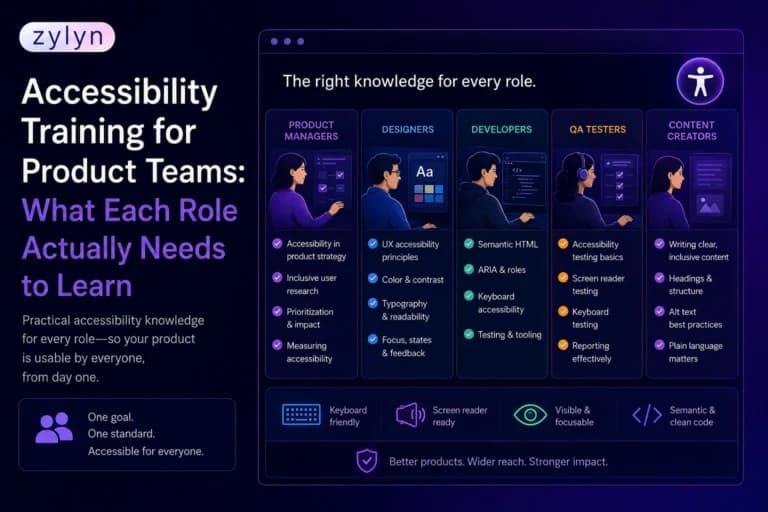
Accessibility training for product teams works when it’s mapped to the decisions each role actually makes. This guide breaks down what every role needs to learn, how much time it takes, which roles get skipped most often, and how to tell whether any of it worked.
Key Takeaways
- Generic awareness training raises sympathy and changes nothing. Role-specific training changes the decisions people make in their own tools.
- The most commonly skipped roles are product managers and content authors, and they’re the ones who set the constraints everyone downstream inherits.
- Measure training by repeat audit findings, not course completions. Completion rates tell you attendance, not capability.
Table of Contents
1. What should accessibility training for product teams actually cover?
2. Why does generic accessibility training fail to change anything?
3. Which accessibility skills does each role actually need?
4. Which roles get skipped, and what does that cost you?
5. How much training does each role really need?
6. How do you know the training actually worked?
7. When should you train instead of hiring or outsourcing?
8. Which mistakes do teams make with accessibility training?
9. Frequently Asked Questions
[IMAGE 1: after the Table of Contents. Illustration of a product team around a table, each person with a different visual overlay above them representing their accessibility responsibility: a contrast ratio for the designer, a code snippet for the developer, a checklist for QA, a heading structure for the content author. ALT: “Accessibility training for product teams showing different responsibilities by role”]
What should accessibility training for product teams actually cover?
Effective accessibility training has two layers. A short shared foundation gives everyone the same vocabulary, the same understanding of who assistive technology users are, and the same view of what the law requires. On top of that sits role-specific instruction tied to the decisions each person actually makes, taught with examples from your own product rather than generic demos.
The foundation layer is small, perhaps two hours, and it’s genuinely universal. Everyone needs to know what a screen reader does, what keyboard-only navigation looks like, and why WCAG 2.2 Level AA is the target most regulations point to.
Everything after that should differ by role. A visual designer never writes an aria-label, and a backend engineer never picks a color token. Teaching both people the same eighty slides guarantees that most of it is irrelevant to each of them.
The best training also uses your own audit findings as the teaching material. Abstract WCAG criteria are forgettable. A screenshot of your own checkout form failing a screen reader test is not.

Why does generic accessibility training fail to change anything?
Because awareness and capability are different problems, and most training only solves the first one. People leave a general session convinced accessibility matters and still unsure what to do differently in their next ticket. Motivation without a specific behavior change evaporates within a sprint.
There’s a related myth worth correcting here, because it drives a lot of misdirected training budget. You’ll frequently see the claim that 67% of accessibility issues originate in design. The figure comes from a single Deque case study, and what that study actually showed was a 67% reduction in automatically detected defects for one organization, which works out to roughly 38% of issues prevented in advance through better design practice.
That’s still a large number, and design training is still worth funding. But treating “67% originate in design” as a law of nature leads teams to over-invest in designers and skip QA, content, and product management entirely. The honest version is that accessibility issues originate wherever a decision goes unexamined, which is why coverage across roles beats depth in one.
The other failure mode is timing. Training delivered months before anyone needs it decays. Training delivered right after an audit, when people can see their own findings, sticks, because there’s something to apply it to immediately.
Which accessibility skills does each role actually need?
Map the skill to the decision. Every role on a product team makes accessibility decisions, and the training should target those decision points rather than the WCAG table of contents.
| Role | Decisions they own | What they need to learn | How you know it landed |
|---|---|---|---|
| Product manager | Scope, priority, definition of done | Writing accessibility acceptance criteria; prioritizing findings by user impact; what conformance claims commit you to | Accessibility criteria appear in stories without prompting |
| UX designer | Flows, interaction patterns, states | Keyboard operation of every pattern; focus order; error handling; annotating designs for assistive technology | Handoffs specify focus behavior and states |
| Visual designer | Color, type, spacing, targets | Contrast ratios of 4.5:1 and 3:1; never using color alone; minimum target sizes; visible focus styling | Design tokens pass contrast before handoff |
| Front-end developer | Markup, components, behavior | Semantic HTML before ARIA; accessible names; focus management; testing with keyboard and screen reader | New components ship with accessible names and focus states |
| QA engineer | What gets caught before release | Keyboard-only test passes; screen reader basics with NVDA or VoiceOver; writing reproducible accessibility bugs | Accessibility bugs filed with WCAG criterion and steps |
| Content author | Copy, headings, links, media | Heading hierarchy; descriptive link text; writing alt text; captions and transcripts; plain language | Published content stops generating repeat findings |
| Engineering lead | Standards, tooling, review gates | Lint and CI configuration; PR review criteria; when to escalate to a specialist | Accessibility checks exist in the pipeline |
| Executive sponsor | Budget, timelines, risk appetite | Legal exposure; procurement impact; what audits and VPATs cost and prove | Accessibility work gets funded before a deadline forces it |
Two patterns are worth pulling out of that table. First, most of these skills are small. Nobody needs to memorize 78 success criteria to do their part well. Second, the “how you know it landed” column is the actual training objective. If you can’t name the observable change, the session has no target.
[IMAGE 2: after the role table. Diagram of a product development lifecycle with each stage labeled by role and the accessibility decision made at that stage. ALT: “Accessibility decisions mapped across the product lifecycle by role”]
Which roles get skipped, and what does that cost you?
Product managers and content authors, almost every time. Training budgets go to designers and developers because accessibility feels like a design and code problem, and the two roles that set the constraints and fill the product with content get nothing.
Skipping product managers is the more expensive of the two. A PM who doesn’t know what accessible means can’t write it into a definition of done, can’t defend the sprint capacity to fix findings, and can’t tell a customer what your product actually supports. Every downstream team then inherits a scope that never included accessibility, and the work becomes a retrofit by default.
Content authors are the quieter cost. Your engineering team can fix every template in the product, and a marketing hire publishing pages in the CMS will reintroduce missing alt text, broken heading order, and “click here” links faster than anyone can audit them. This is the category of issue no linter catches and no code fix prevents, because it’s created after deployment.
QA sits in a similar gap. Automated scanning catches roughly a third of WCAG failures, so the remaining two thirds only get caught if somebody runs a keyboard and screen reader pass before release. If that isn’t in your QA team’s skill set, those issues ship every time and surface later as remediation work at several times the cost.
Want to ground training in your team’s real findings rather than generic examples? Run a free accessibility scan to see which issues your product is actually producing, and which roles are producing them.
How much training does each role really need?
Less than most vendors will quote you, as long as it’s targeted. The mistake is buying a large generic curriculum instead of a small precise one, then watching completion rates stall at 40%.
| Layer | Who | Time | Format | Refresh |
|---|---|---|---|---|
| Foundations | Everyone, including leadership | 1.5 to 2 hours | Self-paced or one live session | Annually, plus onboarding |
| Role-specific | Design, engineering, QA, content, product | Half day per role | Live workshop using your audit findings | Annually |
| Hands-on lab | Developers and QA | Half to full day | Working session with real components | After major stack changes |
| Deep specialist | One or two internal champions | Multi-day | External certification track | Ongoing |
The champion model in that last row is what makes the rest sustainable. One or two people with genuine depth can answer the routine questions, review the tricky components, and decide when something needs outside help. Without them, every question either escalates to a consultant or gets guessed at.
For foundations, you don’t need to pay anyone. The W3C’s free Digital Accessibility Foundations course covers the shared layer well and is designed for technical and non-technical learners alike. Spend your budget on the role-specific layer, where generic material stops being useful.
How do you know the training actually worked?
Track behavior change, not attendance. Completion rate is the metric every training platform reports and the one that tells you least, because sitting through a course and applying it are unrelated activities.
Use these measures instead, in roughly this order of reliability:
- Repeat findings across audits. Compare your last two accessibility audits. If the same categories keep appearing, the training didn’t reach the role producing them.
- Where issues are caught. Count how many accessibility bugs are found in design review versus QA versus production. Training works when the catch point moves earlier.
- Quality of filed bugs. Accessibility tickets that name the WCAG criterion and include reproduction steps signal real QA capability. Vague ones signal awareness without skill.
- Escalation volume. As capability grows, routine questions stop reaching your accessibility champion or external consultant. That drop is a genuine competence signal.
- Time to remediate. Teams that understand the underlying issue fix it faster, and they fix it at the component level rather than instance by instance.
Set a baseline before training happens. Without one, you’ll be arguing about whether things improved rather than showing it, and accessibility budgets rarely survive that conversation twice.
When should you train instead of hiring or outsourcing?
Train for the routine, outsource the judgment calls, and hire when accessibility becomes a continuous obligation rather than a project. Most teams need all three at different points, and the mistake is picking one and expecting it to cover everything.
Training is the right investment when your findings are repetitive and preventable, which describes most audit reports. Missing labels, contrast failures, unlabeled icon buttons, and broken heading order are not hard problems. They’re knowledge gaps, and they recur indefinitely until somebody closes them.
Outsourcing makes sense for the things that need genuine specialism: complex custom widgets, conformance claims that will be published, formal audits, and anything a buyer or regulator will scrutinize. No amount of internal training makes it wise to self-certify a document a procurement team will verify.
Hiring becomes worth it when accessibility work is constant, when you’re shipping into regulated markets, or when the coordination overhead across teams exceeds what a part-time champion can carry. If you’re not there yet, role-specific accessibility training plus periodic external review usually costs less and moves faster, and program-level consulting can design the structure without a permanent headcount.
[IMAGE 3: after this section. Original decision-tree infographic showing when to train, when to outsource, and when to hire, based on issue type, frequency, and regulatory exposure. ALT: “Decision tree for accessibility training versus outsourcing versus hiring an accessibility specialist”]
Which mistakes do teams make with accessibility training?
- Training everyone on the same material. A designer sitting through ARIA syntax and a developer sitting through color theory both learn that accessibility training wastes their time. Split the curriculum by role or expect the attendance to reflect that.
- Teaching WCAG instead of decisions. Walking through success criteria in numerical order is how standards are written, not how work happens. Organize training around the moments in someone’s workflow where a choice gets made.
- Using generic examples. Demo sites are forgettable. Your own audit findings are not, and they come with the added benefit of a fix list your team can work through immediately.
- Training once and calling it done. Skills decay when they aren’t exercised, teams turn over, and new hires arrive with none of the context. Annual refresh plus onboarding coverage is the minimum viable cadence.
- Measuring completions. Attendance data tells you nothing about capability. Baseline your audit findings before training and compare afterward, or you won’t be able to defend the budget next year.
- Skipping leadership. Executives don’t need technical depth, but they set priorities and approve budgets. A team trained to spot issues they’re never given time to fix gets demoralized quickly.
Frequently Asked Questions
How long does accessibility training take?
Roughly two hours for shared foundations across a whole team, plus about half a day of hands-on role training for design, development, QA, or content.
Who on a product team needs accessibility training?
Everyone who makes a decision that reaches a user: product, design, engineering, QA, content, and the leaders who set priorities and budgets.
Is free accessibility training good enough?
For foundations, yes. The W3C’s free course covers the basics well. Role-specific skills and your own product’s patterns need tailored training.
Should designers learn to code for accessibility?
No. They need to know what their decisions require in code, so handoffs specify focus order, states, and labels instead of leaving them to guesswork.
Does accessibility training reduce audit findings?
It should, and that’s the metric to track. Compare repeat findings across two audits rather than counting how many people finished a course.
How often should teams retrain?
Refresh annually and cover new hires within their first month. Skills decay quickly when they aren’t exercised in everyday work.
What’s the difference between awareness and role training?
Awareness explains why accessibility matters and who it affects. Role training teaches the specific decisions and checks your particular job requires.
Do QA testers need screen reader training?
Yes. Keyboard and screen reader passes catch the majority of issues automation misses, and QA is usually the last checkpoint before release.
Can we train instead of hiring an accessibility specialist?
Up to a point. Training handles routine decisions well. Complex widgets, published conformance claims, and formal audits still need specialist judgment.
What accessibility certifications exist?
IAAP offers CPACC for broad knowledge and WAS for technical testing. Both are useful for specialists and unnecessary for most product team members.
Where should you start?
Start with an audit, not a curriculum. Your findings tell you which roles are producing which issues, and that turns a vague training plan into a targeted one with a measurable baseline attached.
Then build the two layers: a short shared foundation everyone gets, and role-specific sessions that use your own findings as the teaching material. Cover the roles that usually get skipped, particularly product management and content, because they set the conditions everyone else works inside.
Accessibility training for product teams isn’t really about knowledge transfer. It’s about moving the point where issues get caught, from the audit report backward into design review, code review, and QA, where fixing them costs a fraction as much.
Ready to build a training plan around your team’s actual gaps? Book a discovery call with the Zylyn team, or start with role-specific accessibility training built on findings from your own product.